

Feedback Form: ColdFusion version
Frequently Asked Questionsthen contact our support service
Questions
I have it now, but I can not get it to work. Are you able to help me with this?
Is the extension MAC compatible ?
Are any programming skills needed to use the Coldfusion Feedback Form?
What browsers does it support?
Answers
I have it now, but I can not get it to work. Are you able to help me with this?
After installation, please restart your Dreamweaver and you will see a new entry in the Dreamweaver Commands Menu called "Insert TSCFMFeedback". Just click on this option, enter your email address and subject and upload your page and the TSCFMPFeedback folder onto your web site. That's all.
After upload, if you still have problems to get it to work you can contact our support service.
Is the extension MAC compatible ?
Then you need to insert the extension in the template page (just to generate the scripts) or manually paste the scripts from a normal page into the template.
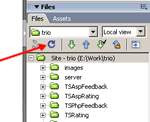 Please, be sure to upload the "TSCFMFeedback" folder. This folder is generated automatically when inserting the extension and contains the required scripts for the component. If you don't see the "TSCFMFeedback" folder in your Dreamweaver file list, then click the refresh button (see image for details).
Are any programming skills needed to use the Coldfusion Feedback Form?
Of course, you need to know if your web server(hosting) supports ColdFusion.
What browsers does it support?
- Safari
- Firefox
- Opera
- Internet Explorer for Windows
- Netscape
- Mozilla
The extension is MAC compatible. Our extensions are tested, approved and published by the Adobe Exchange Team at http://www.adobe.com/cfusion/exchange/index.cfm
How to change the Feedback size and colors?
The styles are located into the file "TSFeedback.css".
To change the feedback link's size and color (Feedback [+]) you must edit the styles "#TSFeedback #TSFeedbackButton", example:
#TSFeedback #TSFeedbackButton{
font-size:14px;
color: #FF0000;
float:right;
}
If you want to increase the feedback form’s area you must modify the width in the following styles:
#TSFeedback
#TSFeedback #TSFeedbackContainer #TSFeedbackClose
#TSFeedback #TSFeedbackContainer #TSFeedbackForm
#TSFeedback #TSFeedbackContainer #TSFeedbackResponse
The first two styles must have the same width (default value is 160px).
The last two styles must have the same width but at least 10px less that the first two styles (default value is 150px).
How can I modify the look & feel?
#TSFeedback: This is the style applied to all the DIV that contains the Feedback, including the feedback link, the animated image, the form and the confirmation message.
#TSFeedback #TSFeedbackContainer #TSFeedbackClose: Affects the area that is opened/closed. The form and confirmation message are located into this area.
#TSFeedback #TSFeedbackContainer #TSFeedbackClose
#TSFeedbackCloseButton: Is the text that says "close [+]"
#TSFeedback #TSFeedbackContainer #TSFeedbackForm: Affects the area that contains the form and that will be replaced with the confirmation message.
#TSFeedback #TSFeedbackContainer #TSFeedbackCorner: This style defines the position of the bottom corner that appears below the form.
#TSFeedback #TSFeedbackButton: Affects the Feedback link with the animated image [+]
#feedbackSender: Affects the email field (input element). This style is not currently present in the CSS file, you should add it.
#feedbackMessage: Affects the message field (textarea element). This style is not currently present in the CSS file, you should add it.
#sendFeedbackMessage: Affects the "Send" button (input/submit element). This style is not currently present in the CSS file, you should add it.