

Help Hints for Web
A Dreamweaver™ ExtensionWorks with Dreamweaver MX, MX 2004,
DW 8, CS3, CS4, CS5, CS6 or later versions
Also available as independent script
DW 8, CS3, CS4, CS5, CS6 or later versions
Also available as independent script
Demo
See an example below:
- Red tones -
- Blue tones -
- Classic tones -
- With logo in background -
- Soft fade effect -
- Fast appear -
Features
Shows help hints over links, form fields and images.
The help hints are shown using fade transition effects and can accept HTML formatting.
Features:
The help hints are shown using fade transition effects and can accept HTML formatting.
Features:
- Style, color, fonts, background, including background images can be set up to match your Web site perfectly.
- Compatible with most browsers, both PC and Mac.
- Very easy to install. You can add hints to your pages just with one click!
- Also available as standalone script for use directly without Dreamweaver. This includes the possibility of integration with server side scripts to generate help hints.
- Can be se up to show your logo in background, making your website unique and original.
- No programming skills required.
- No server side scripts required.
Fast Tutorial
Video tutorial: Help Hints for Web
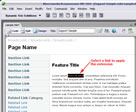
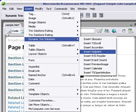
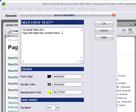
Read more in the Help Hints for Web - Frequently Asked Questions.
Installation
Doubleclick the HelpHints.mxp archive or use for the extension installation process the Adobe Extension Manager distributed with the Adobe Dreamweaver Application.
Restart Dreamweaver.
Go to Insert (or Insertbar) => Dynamic Trio Solutions => Insert HelpHints
Restart Dreamweaver.
Go to Insert (or Insertbar) => Dynamic Trio Solutions => Insert HelpHints
Tips
- You can attach the help hints to form fields, links and images
- Compatible with special characters (ex: non-latin alphabet)
- Accepts HTML Tags (except links)
- You can configure visually the fade speed
- Help hints are handier than sending the user to Help page.
Instant Download
Download Includes:
- TS HelpHints Dreamweaver™ Extension
- TS HelpHints standalone script
- Help File
- Samples
|
Preferred payment & download method:
|
|
| Paypal or Credit Cards: |
PRICE
After payment you will be redirected to a direct-download page and the download link will be emailed to the payment address.
USD $9.90 |